VAFT — Versatile Analysis Framework for Tokamak


Connecting Nuclear Fusion Knowledge Across Domains for Integrated Tokamak Research
Machine-agnostic workflows for interoperable IMAS data and reproducible tokamak analysis.
vaft.setup() vaft help
Get started
vaft.setup() or vaft help.
TutorialsRunnable notebooks with verified outputs.
GuidesResearch workflows from data access to stability.
Catalogs and APIThe API, formula and process catalogs.
GUIBrowse and plot data with vaft gui.
From the machine to the analysis
- VESTDiagnostics and machine data from the tokamak.
- IMAS ODSStandardized, per-shot OMAS data structures.
- HSDS / FileDBThe shared database, remote or on disk.
- Analysis codesEFIT, CHEASE, GPEC, TokaMaker and VAFT's own models.
VAFT is a standardized, verifiable, and interoperable scientific framework for machine-agnostic tokamak research. It connects experimental data, reconstructed and simulated plasma states, and analysis workflows across research modes and physics domains (Research domains). Shared data structures and traceable results make these contributions easier to use together and verify. Its full end-to-end implementation on the VEST (Versatile Experiment Spherical Torus) tokamak at Seoul National University serves as the reference implementation for modern, reproducible, and data-driven fusion research.
It provides an IMAS-compliant data interface built on the OMAS interface library and an HSDS remote HDF5 database. Read access to the VEST database is open to all users; writing to the database is restricted to authorized accounts.
Hong-Sik Yun, Sunjae Lee et al 2025 Plasma Phys. Control. Fusion 67 115021 — “Developing an IMAS-compatible platform for the university-scale tokamak VEST and its application to operating characteristics analysis” (doi:10.1088/1361-6587/ae1b6a)
What VAFT is
Four things, which together are what “framework” means here.
- Standardized Data Interface — standardized data representations, data processing, validation, visualization and community physics codes (EFIT, CHEASE, GPEC, TokaMaker, VFIT) integrated into one scientific workflow, interoperating rather than reimplemented.
- Traceable & Reproducible Pipeline — traceable and reproducible data products from machine design to reconstructed and simulated states, which is what makes a result verifiable against its provenance and assumptions. Versioning covers geometry, diagnostic mappings, calibration, conventions, processing logic and schema versions, not only source code.
- FAIR Scientific Data Repository — validated data preserved and shared in both native and standardized representations, following the FAIR principles, as the foundation for finding which experimental and modelling information exists for a shot.
- Machine Knowledge Archive — machine configuration and history, experimental history, decisions, documentation, tutorials and notebooks of the VEST tokamak since 2012, kept usable for long-term verification, comparison and study.
Choose a path
Key features
| Capability | Description |
|---|---|
| Remote database access | Load per-shot OMAS ODS data from the VEST HSDS server with a single function call |
| Machine mapping | Convert native VEST diagnostic signals into standardized IMAS IDSs (magnetics, Thomson scattering, barometry, PF active, TF, spectrometer UV, charge exchange, etc.) |
| Equilibrium & stability | Interfaces for EFIT, CHEASE, GPEC (DCON/RDCON) — read/write code I/O in IDS format |
| Physics formulas | Equilibrium quantities (poloidal/toroidal flux, safety factor), stability metrics (beta limits, ballooning), confinement scaling laws (ITER89P, H98y2), Green’s functions |
| Signal processing | Smoothing, baseline subtraction, noise reduction, electromagnetic field calculations, eddy current modeling |
| Profile fitting | Map kinetic diagnostics (Thomson scattering, CES) onto equilibrium flux surfaces; fit with GP, polynomial, or exponential models |
| Visualization | Time traces, 1D/2D profiles, flux surface contours, top-view, and operational-space maps |
| IMAS interoperability | Convert between OMAS ODS and IMAS-Python (AL5) data structures; export to NetCDF |
Architecture
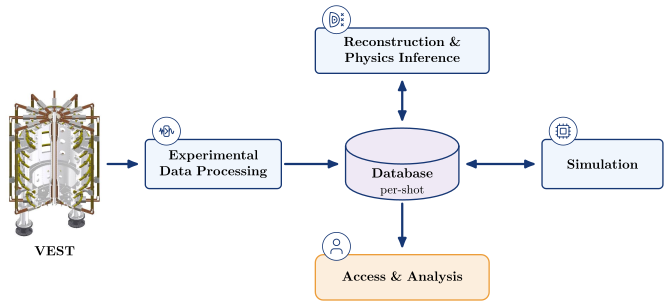
Experiment, experimental data processing, a per-shot database shared by reconstruction and simulation, and access and analysis. The reference view, with every section’s content, is on Diagrams.
Available IMAS IDSs in the VEST database
Experimental:
dataset_description · magnetics · tf · pf_active · barometry · spectrometer_uv ·
thomson_scattering · charge_exchange
Modelling:
wall · em_coupling · pf_passive · equilibrium (EFIT/CHEASE) · core_profiles ·
mhd_linear (DCON/RDCON)
Quick start
import vaft

ods = vaft.database.load(39915)     # OMAS ODS for one shot, from the public HSDS directory
ip = ods['magnetics.ip.0.data']     # IMAS-structured access
Install from source, add the HSDS client, then configure your connection:
git clone https://github.com/VEST-Tokamak/vaft.git
cd vaft
python -m pip install -e .
The source install includes h5pyd. Start with the packaged offline sample, then configure HSDS only
when you need public VEST data. See Start here for both paths.
Documentation
| Guide | Contents |
|---|---|
| Research workflows | Start with an offline result and continue through the VEST analysis chain |
| Data access and IMAS | Load, inspect, map and convert experimental data |
| Equilibrium and kinetic profiles | Reconstruct equilibria and fit diagnostic profiles |
| Automated pipelines | Snakemake routine, corrective and summary workflows |
| VAFT API | Module-by-module library reference |
| VEST diagnostics and data availability | Generated registry of data source, availability, lifecycle and VAFT mapping status |
| Notebooks | Runnable notebooks, design shells and verified outputs |
Resources
- Source: github.com/VEST-Tokamak/vaft
- OMAS: gafusion.github.io/omas — Python API for IMAS data structures
- OMFIT: omfit.io — integrated modeling and experimental data analysis framework
- HSDS: github.com/HDFGroup/hsds — HDF5 REST-based data service
- h5pyd: github.com/HDFGroup/h5pyd — Python client for HSDS
- IMAS: IMAS-Data-Dictionary — ITER Integrated Modelling & Analysis Suite
Contact and support
All users may read the VEST datasets, while shared-database writes require authorization. For maintenance, write access, technical-system routing, and issue reporting, use Contacts. For more about the laboratory and the VEST device, visit Nuplex.