Database and data sources
vaft.database is the I/O layer of VAFT. It has two independent back-ends, and knowing which one
you are talking to explains almost every argument on this page:
Cross-shot parameter history
Canonical summary tables include shot and pulse_time_begin, followed by
the preset’s quantities. The acquisition timestamp comes from
dataset_description.pulse_time_begin; older shots may have no timestamp.
import vaft

df = vaft.database.summary((38000, 46000), preset="shot_overview")
fig, ax = vaft.plot.plot_parameter_history(
    df, y="max_ip_kA", secondary_x="date"
)

# Show elapsed calendar time geometrically, with shot labels above it.
fig, ax = vaft.plot.plot_parameter_history(
    df, y="max_ip_kA", x="date", secondary_x="shot"
)
Shot number and acquisition time are different campaign coordinates. The secondary axis labels recorded observations; it does not assume a globally linear transformation between shot and date. Date-primary plots omit rows without acquisition timestamps. Summaries with several rows per shot retain every row; select the desired time slices in the DataFrame before plotting.
The same tables can be built offline from in-memory ODS, for example the packaged samples:
samples = {shot: vaft.omas.sample_ods(shot) for shot in (39915, 41672)}
slices = vaft.database.summary(odss=samples, preset="equilibrium_global")
slices.attrs["skipped"]        # [{"shot": ..., "reason": ...}] for shots the preset could not run on
summary(odss=...) (also vaft.database.summary_from_ods) runs the same extractor, shot-level
columns, column order and sort as the database path, so a shot gives the same table either way. It
takes a {shot: ods} mapping or ODS objects that record dataset_description.data_entry.pulse.
Each extractor sees a private copy of only the IDS the preset reads, exactly as the database path’s
open(..., paths=...) view does, so the caller’s ODS is not modified and an IDS outside the preset
does not change the result. A preset IDS the ODS lacks is absent offline; on the database path it
fails only when first read, so an extractor that tolerates the missing IDS gives the same row either
way. source (default
"local") only labels the source/equilibrium_source columns. Both paths list the shots they
skipped, with the reason, in attrs["skipped"].
Transport summary hierarchy
equilibrium_global and core_profiles describe their respective time
slices. neoclassical summarizes bootstrap current from canonical
core_profiles, one row per slice. Each row also carries the NEO core_transport
slice that corresponds to it (#1655):
- Status column.
transport_match_statusnames the result. -
When the descriptors fill. The flux descriptors ( q_e/q_i/gamma_epoint counts, finiterho_tor_normcoverage,peak , transport_rho_grid_*) are filled only when the status ismatched. - When a row is
matched. All of these must hold:- exactly one
core_transportmodel is neoclassical (identifier 5); - exactly one of its slices lies within 1 us of the bootstrap slice’s own time;
- both IDSs name NEO as producer, with the same revision when both record one.
- exactly one
- Failure statuses.
bootstrap_time_unknown,no_neoclassical_model,ambiguous_models,no_slice_at_time,ambiguous_slices,producer_mismatchandno_flux_grid. - No fallbacks. The first model and the nearest time are never chosen.
- Unmatched rows. They keep their bootstrap columns.
- State identity. The NEO mappers store no resolved-state identity in either IDS (only the stage manifest carries
state_sha256), so the state is matched through time and producer. - Missing versus zero. Unmatched rows leave every flux descriptor missing (NaN), point counts included; a 0 count means a matched slice without that channel.
- Source. The
sourcecolumn records the occurrence. The preset key stays(shot, cp_index), as before, so an upsert of tables from two sources into one file still replaces by(shot, cp_index). Keep one file per source, or passkey_columnswithsourcetoexport_summary.
turbulent_transport summarizes anomalous models already
stored in canonical core_transport: one row per shot, model entry, and time
slice. It reads no TGLF or CGYRO native output and does not combine models.
transport = vaft.database.summary((39915, 39916), preset="turbulent_transport")
transport[["shot", "time_s", "source", "model_index", "rho_grid_min",
           "rho_grid_max", "q_e_peak_abs_W_m2", "q_i_peak_abs_W_m2"]]
The peak columns are maxima of the absolute mapped SI flux over finite
rho_tor_norm grid points, not full radial profiles. rho_grid_min/max
describe the stored grid; rho_q_e_min/max, rho_q_i_min/max, and
rho_gamma_e_min/max describe the finite coverage of each reported flux
channel. Each channel also has a point count. q_i sums all recorded ion species
at each point only when every ion flux is present. parameters_text_sha256
identifies exact stored model.code.parameters text, when present; it is not a
configuration-equivalence key because the text can include state-specific
provenance. configuration_status=not_standardized makes that limit explicit.
The current TGLF mapper reuses its anomalous model slot and does not persist
SAT/field settings there, so comparisons across settings need the upstream
run record until that mapping contract is extended.
classical_transport summarizes the classical (Braginskii) baseline of #1435
once vaft.machine_mapping.classical.core_transport_from_classical has written it
to core_transport (#1654). The data dictionary has no classical identifier, so
the entry uses the private index -1 with the name classical, and both are
required. One entry holds one formulation and one EFIT lineage, and every time
slice names its resolved state_identity in code.parameters. Rows therefore
never mix states, lineages or formulations. The mapper refuses a write without a
state_identity, and a second, different state at a time already written.
configuration_status is state_unrecorded or unrecorded when the record is
missing. The classical mapper marks core_transport heterogeneous
(homogeneous_time = 0), because its slice indices are per entry; the NEO, TGLF
and gyrokinetics mappers keep that 0, since each of their slices also carries its
own time.
What each source field means, and where it goes:
classical_heat_fluxes field |
Meaning | core_transport leaf |
Summary column |
|---|---|---|---|
electron_energy_flux_W_m2 |
Perpendicular conductive heat flux of the stated model, q = -kappa dT/dr, positive down the gradient |
electrons.energy.flux on grid_flux |
q_e_peak_abs_W_m2, q_e_points, rho_q_e_min/max |
ion_energy_flux_W_m2 (z=<charge>) |
The same flux for the main ion only | ion.0.energy.flux, ion.0.z_ion |
q_i_peak_abs_W_m2, q_i_points, rho_q_i_min/max, main_ion_z |
chi_e_m2_s, chi_i_m2_s |
The model’s diffusivity, with q = n chi (-dT/dr): a coefficient, not a flux |
energy.d on grid_d |
chi_e_max_m2_s, chi_i_max_m2_s |
electron_particle_flux_m2_s (None) |
Not evaluated by the model | not written | particle_flux_status = not_evaluated |
tau_e_s, tau_i_s, coulomb_logarithm*, gamma1_perp, b_tesla |
Diagnostics of the evaluation | not written (no definitional home) | none |
model (CLASSICAL_MODEL) |
Formulation text | code.parameters |
formulation_sha256 |
Some quantities never appear at all:
- Reference scale. The order-of-magnitude
nu rho^2reference scale (#780/#1112) is not a product of #1435 and is never written or summarized. - Undefined surfaces. A surface below 10 eV, where the electron Coulomb logarithm is undefined, is dropped and named rather than filled.
- Missing versus zero. Missing data shows as zero points and NaN peaks. A stored zero is a physical zero.
Example from the packaged 48224 sample (magnetics state at 0.300 s, r/a 0.3–0.8):
rho_tor_norm          0.259   0.346   0.433   0.522   0.614   0.711
electrons.energy.flux -42.1   -25.7    -7.5     3.4     5.7     3.4   W/m^2
ion.0.energy.flux     181.5    97.5    12.9   -17.6    -7.6     3.1   W/m^2
electrons.energy.d    0.080   0.065   0.050   0.037   0.025   0.016   m^2/s
ion.0.energy.d        2.86    2.57    2.11    1.54    0.99    0.56    m^2/s
summary row: q_e_peak_abs_W_m2 42.1, q_i_peak_abs_W_m2 181.5,
             chi_e_max_m2_s 0.080, chi_i_max_m2_s 2.86, particle_flux_status not_evaluated
The negative inner electron flux is real: VEST’s hollow T_e makes the inner
gradient point outward, and the peak columns report magnitudes.
power_balance likewise awaits the stored-energy and loss-power definitions
tracked in issues #1282 and #548.
| Back-end | Module | What a shot looks like | What you get back |
|---|---|---|---|
| HSDS — remote IMAS HDF5 store | vaft.database.ods, vaft.database.ids, vaft.database.utils |
a folder hdf5://{directory}/{shot}/ holding master.h5 plus one <ids_name>.h5 per IDS |
an OMAS ODS, or a native IMAS IDSToplevel |
| Raw DAQ — VEST MySQL database | vaft.database.raw |
rows in shotDataWaveform_* addressed by integer field code |
(time, data) NumPy arrays |
flowchart LR
    HSDS[(VEST HSDS<br/>IMAS HDF5 images)]
    SQL[(VEST MySQL<br/>raw DAQ waveforms)]
    subgraph db["vaft.database"]
        ods["ods.load_ods / ods.save_ods"]
        ids["ids.load / ids.save"]
        raw["raw.load_raw"]
    end
    HSDS -->|hsget| ods
    HSDS -->|hsget| ids
    SQL -->|mysql-connector| raw
    ods --> ODS["omas.ODS"]
    ids --> IDS["imas IDSToplevel"]
    raw --> ARR["(time, data) ndarrays"]
The IMAS/ODS data model itself is described in Data structures; this page is about getting the data.
The flat namespace
vaft/__init__.py and vaft/database/__init__.py are both lazy. import vaft is enough — you never
need import vaft.database. The database package also resolves unknown attributes by scanning its
submodules in the order ods, ids, raw, utils, so helpers defined in raw.py or utils.py
are reachable flat:
import vaft

vaft.database.is_connect()          # defined in database/utils.py
vaft.database.exist_shot('public')  # defined in database/utils.py
vaft.database.load_raw(39915, 102)  # defined in database/raw.py
The supported high-level remote API is load, open, and save. The raw, filedb, ods,
ids, and utils modules remain available for specialized and compatibility workflows.
Connecting to HSDS
h5pyd is a declared VAFT dependency on develop; a normal pip install . installs the compatible
client and its command-line tools. Do not install a separately pinned --no-deps copy.
Then write your credentials with vaft hsds configure:
vaft hsds configure
Do not use the upstream
hsconfigurefor this: it reads the password as visible text and prints an already-stored password as the prompt default.vaft hsds configurewrites the same h5pyd~/.hscfgwith hidden input and mode0600(on Windows file modes are not enforced; the file inherits your user-profile permissions). Never commit a.hscfg.
| Field | Value |
|---|---|
| Server endpoint | http://147.46.36.244:5101 |
| Username / Password | reader / test (read-only public account) |
This writes ~/.hscfg with mode 0600; h5pyd reads a .hscfg in the working directory instead
when one exists, and HS_ENDPOINT/HS_USERNAME/HS_PASSWORD/HS_API_KEY override either file.
python install/check_vaft_environment.py warns when a .hscfg is readable by other users. Never
commit that file.
Check the connection from Python:
import vaft

vaft.database.is_connect()   # True when the HSDS server reports state == "READY"
Local OMAS and IMAS operations do not require HSDS at all; use vaft.omas.load/save or
vaft.imas.load/save for those paths. See Start here for
the full environment setup.
Listing shots
vaft.database.exist_shot()                       # numeric shot folders in /public/, newest first
vaft.database.exist_shot('public', shot=39915)   # True / False
vaft.database.exist_shot('public', sort=1)       # ascending
vaft.database.exist_shot(data_filter='ts')       # DataFrame of processed Thomson-scattering shots
Full signature:
exist_shot(username=None, shot=None, data_filter=None, sort=-1)
usernamedefaults to'public'. Any other folder name returns that folder’s raw listing.sortis1(ascending),-1(descending, the default) or0(unsorted).data_filter='ts'(also'thomson_scattering') ignoresusername/shotand returns apandas.DataFramewith columnsIndex, Shot Number, Last Processed, Status, read from the processed-shots registryprocessed_shots.h5of the named source (its URI isvaft.database.utils.processed_registry_uri(source)). It returnsNonewhen nothing has been processed.- Shot folders come back as strings, not ints. A connection failure prints
Connection errorand returns[]/False.
Eager and lazy HSDS access
Source namespaces and data products
Each remote operation names one analysis lineage with source. The default main
holds VAFT-native results; public is the readable, legacy lineage and is never
written by VAFT. Other established sources include chease-mhd-stability
(CHEASE refinement and linear MHD), vfit-element, vfit-gse,
electron-efit, kinetic-efit, and the sparse impa diagnostic source.
A missing shot in impa means no IMPA product was published for that shot; it
does not say whether the shot exists in main. Reads never silently union
sources. Use vaft.database.compose(shot) when analysis needs products from
main and impa together while retaining each channel’s origin.
python -m vaft.cli summary sources lists the catalog; custom namespaces must
be declared in VAFT_HSDS_EXTRA_SOURCES.
Transitional TGLF configuration sources
TGLF results depend on the saturation rule (SAT0–SAT3) and the field model
(es, em-bper, em-bper-bpar), and no configuration is the default
(#1482). Each
configuration is therefore stored as its own sparse source beneath the
reconstruction its state was mapped on, so alternative configurations of one
state coexist instead of overwriting one another
(#1900). The
turbulent_transport stage owns core_transport only. Its FileDB product is
omas/turbulent_transport/{family}/tglf-sat<n>-<field>/{shot}/, and
replication_for_stage("turbulent_transport", family=..., product="tglf-sat3-em-bper")
names its destination. There is no default configuration: a call without
product is refused.
These sources are transitional. In the self-describing occurrence model of
#1128 and
#1129, each one becomes a
named core_transport occurrence. The builder already writes the future name
into ids_properties.name, so migration renames nothing:
| Transitional source | IDS | Future ids_properties.name |
Occurrence |
|---|---|---|---|
main/tglf-sat<n>-<field> |
core_transport |
tglf-sat<n>-<field>-from-magnetic-efit |
allocated by the #1129 VEST catalog (not assigned yet) |
electron-efit/tglf-sat<n>-<field> |
core_transport |
tglf-sat<n>-<field>-from-electron-efit |
allocated by the #1129 VEST catalog (not assigned yet) |
kinetic-efit/tglf-sat<n>-<field> |
core_transport |
tglf-sat<n>-<field>-from-kinetic-efit |
allocated by the #1129 VEST catalog (not assigned yet) |
For example, SAT3 with em-bper on a magnetic-EFIT state is stored in
main/tglf-sat3-em-bper and named tglf-sat3-em-bper-from-magnetic-efit.
The routine driver’s lineage magnetics maps to the magnetic family and
electron_kinetic to the electron family. The kinetic family has no TGLF
states yet, but its sources are catalogued. The full list of 36 rows is
vaft.database.sources.turbulent_transport_migration(). The upstream state’s
identity (state identity, run identities, TGLF parameters, GACODE revision)
travels in core_transport.model[:].code.parameters and in the stage manifest.
Coexistence holds across configurations and lineages. Alternative Ti
assumptions of one state (a different --ti-te-ratio, --use-inferred-ti or
--rho-max gives a different state identity on the same path) are refused, not
stored side by side, until #1128/#1129: writing a product whose state
identities differ from the stored one raises, and rewriting the same states is
allowed.
Eager load() stages a complete shot when paths is absent. With
paths=["equilibrium"], it stages only that IDS and dataset_description,
normally using a validated local domain cache. Byte-exact per-IDS images avoid
repeated hsget requests when available; transport="canonical" bypasses
them and transport="h5image" requires them. Direct lazy open() reads
selected leaves from the canonical IDS domain and currently supports occurrence
- Native lazy IMAS also requires the exact stored Data Dictionary version.
The local HSDS cache
cache="auto" (the default) keeps every validated domain it downloads in a persistent local cache,
~/.cache/vaft/hsds, or $VAFT_CACHE_DIR/hsds when that is set. The cache is disposable: every entry is checked against the server’s revision before use and is
fetched again when missing, so it is never the source of truth. cache="off" always downloads;
cache=<path> uses another base directory.
The cache is capped at 1 GiB by default. After every write the least-recently-used domains are evicted until it fits, and a single domain larger than the cap is read without being cached. The cap is taken from the first of:
- the
cache_maxargument ofload()orexport(); - the
VAFT_HSDS_CACHE_MAXenvironment variable; cache_maxin the[hsds]table of~/.config/vaft/config.toml(or under$XDG_CONFIG_HOME), whichvaft cache set-limitwrites (it refuses a file layout it cannot edit safely; on Python 3.10 withouttomlithat is anything beyond plain tables andkey = valuelines);- the 1 GiB default.
Sizes are bytes or binary multiples (500M, 20G; 1G is 1024³ bytes). 0 disables caching,
and none or unlimited removes the cap. A server or pipeline can keep a large cache on its own
volume (VAFT_CACHE_DIR), and one-shot reads can pass cache_max=0.
vaft cache info                 # location, used size, cap and which setting it came from
vaft cache list --shot 39915    # cached domains, least recently used first
vaft cache prune                # evict down to the cap now (or --max 500M, --older-than 30d)
vaft cache clear --shot 39915   # remove one shot's domains; the whole cache needs --yes
vaft cache set-limit 5G         # persist the cap in the user config file
The same operations are available from Python in vaft.database.hsds_cache (info, entries,
prune, clear, set_cache_max).
- What can be removed. Only domains VAFT wrote: a file in an
<endpoint hash>/<source>/<shot>/directory that the directory’smanifest.jsonlists. Acache=<path>base other than the default must also carry the.vaft-hsds-cachemarker, which the firstload()using it writes. Other files under the cache directory, and data given bypath=/local_dir=, are never touched. - Recency. It is the file modification time, which VAFT sets on every hit and write, so
noatimemounts do not matter. - Concurrency. Copies into and out of the cache, manifest updates and every eviction are serialized by a lock file in the cache directory. That lock is POSIX-only: on Windows two processes sharing a capped cache are not serialized.
- Failures. The cache is best-effort. A failed cache write or eviction is logged and the load
still returns its data. An unreadable
VAFT_HSDS_CACHE_MAXor config file is logged and the default cap applies.
Canonical IMAS images remain authoritative after a save. The default
derived_cache="auto" also creates per-IDS images; the historical full-ODS
cache is readable but is published only on explicit request. The explicit
options are "none", "imas-images", "omas", and "both".
vaft.database.load materializes data before returning it. The default representation is an
OMAS ODS:
import vaft

ods = vaft.database.load(39915, source="public", paths="magnetics")

time = ods['magnetics.time']
ip = ods['magnetics.ip.0.data']
The current high-level signature is:
load(shot, source=None, *, representation="omas", paths=None,
     occurrence=None, imas_version=None, cache="auto", transport="auto",
     cache_max=None)
source=None resolves to the default source, main; pass source="public" for the legacy public
lineage the worked examples on this site read.
Set representation="imas" for native IDS objects. OMAS paths may point at an IDS root or leaf;
native IMAS requests accept top-level IDS names only.
# Several shots at once -> list of ODS
ods_list = vaft.database.load([39915, 39916, 39917], paths="magnetics")

# Native IDS materialization
equilibrium = vaft.database.load(
    39915, representation="imas", paths="equilibrium"
)

# Lazy, read-only access: data is fetched only when a path is touched
with vaft.database.open(39915, source="public", paths="equilibrium") as remote:
    times = remote["equilibrium.time"]
open() returns a context-managed lazy OMAS or native-IMAS adapter and never exposes a write
operation. Lazy native IMAS access does not convert Data Dictionary versions; use eager load()
when conversion is required.
Local OMAS, IMAS, and FileDB paths
Local artifact I/O belongs to the representation modules:
import vaft

ods = vaft.omas.sample_ods()
vaft.omas.save(ods, "shot.json.gz")
restored = vaft.omas.load("shot.json.gz")

# A native IMAS HDF5 entry is a directory (master.h5 plus one image per IDS)
vaft.imas.save(ods, "imas-entry")
restored = vaft.imas.load("imas-entry")
vaft.database.filedb.FileDB resolves canonical, OMAS-first archive locations without writing:
from vaft.database.filedb import FileDB

db = FileDB.from_config({"filedb": {"root": "/srv/vest.filedb"}})
path = db.path("omas", shot=39915)
Set VAFT_FILEDB_DIR when the configuration uses that environment reference. The audit helpers are
read-only and propose legacy-to-canonical mappings without moving data.
Exporting a shot as local files
A shot on HSDS is a folder (master.h5 plus one image per IDS), so hsget cannot fetch it whole.
vaft export stages the shot once and writes every requested format from that one copy:
vaft export --shot 41672 --source public --backend imas-nc omas-json geqdsk
vaft.database.export(41672, source="public", backend=["imas-nc", "omas-json", "geqdsk"])
| backend | written as | format |
|---|---|---|
imas-hdf5 |
imas_<shot>_hdf5/ |
native IMAS HDF5 Data Entry, copied as stored |
imas-nc |
imas_<shot>.nc |
IMAS netCDF convention (IMAS-Python) |
omas-json |
omas_<shot>.json |
OMAS JSON |
omas-hdf5 |
omas_<shot>.h5 |
OMAS single-file HDF5, not an IMAS Data Entry |
omas-nc |
omas_<shot>.nc |
OMAS flat netCDF, not the IMAS convention |
geqdsk |
geqdsk_<shot>/ |
one g-file per equilibrium time slice |
Artifacts go directly under --output (default: the current directory). Existing ones are refused
unless --overwrite is given, and a backend that fails leaves nothing behind. The converted backends
read occurrence 0 and refuse a shot that stores other occurrences; imas-hdf5 keeps them all.
Export reads the DD version the IDS were stored with (the newest one when stages wrote different
minor versions) and never converts across a major version: a shot mixing DD 3 and DD 4 IDS is
refused, and geqdsk needs a DD 3 shot, because DD 4 flips the psi sign convention (COCOS 17).
Both netCDF backends need the netCDF4 package.
Saving to HSDS
Which production stage publishes which IDS to which source, generated from STAGE_REPLICATION,
is shown in the HSDS publication view of the
pipeline lineage explorer.
save(data, shot, *, source=None, representation=None, occurrence=None,
     imas_version=None, derived_cache="auto")
# Remote writes are admin-restricted; ordinary documentation and analysis are read-only.
uri = vaft.database.save(ods, 39915, source="my-authorized-namespace")
source must be a bare HSDS namespace, never an hdf5:// URI. It defaults to None, which resolves
to main; the legacy public source is read-only, so save(..., source="public") raises
ReadOnlySourceError. target= and directory= are deprecated aliases for source= and warn. VAFT infers OMAS versus native IMAS
from the supplied object and rejects a conflicting explicit representation.
A write adds to the shot rather than replacing it. A shot’s master.h5 links every IDS file stored
beside it, and a reader resolves the shot through those links. Each write therefore replaces the
master with the stored one plus its own IDS. It re-reads the stored master immediately before
replacing it, and holds a per-shot lock while it does (issue #913). Two writes of one shot on the same
host can no longer drop each other’s links, and different shots never wait for each other. The lock
lives in $VAFT_HSDS_LOCK_DIR (default /tmp/vaft-hsds-locks); if this account cannot create files
there, the writer locks in a per-user directory under the temp root and warns once. It does not
reach writers on other hosts or tools that bypass VAFT. vaft maintenance audit-masters --shots FIRST-LAST [--apply] finds,
and relinks, files a master does not name.
Native IMAS IDS objects
When you want an IDSToplevel from imas rather than an OMAS ODS, use the IDS pair. These live on the
vaft.database.ids submodule; there is no vaft.database.load_ids / save_ids at package level.
eq = vaft.database.ids.load(2, "equilibrium", dd_version="3.41.0")

# A list of IDS names returns a dict {name: ids}
idss = vaft.database.ids.load(2, ["equilibrium", "pf_active"])
For a whole shot as native IMAS rather than one IDS, vaft.database.load takes
representation="imas".
ids.load(shot, ids_name, source=None, occurrence=0, dd_version=None, local_dir=None,
         cache="auto", transport="auto", *, directory=None)
ids.save(ids, shot, source=None, dd_version=None, *, directory=None, derived_cache="auto")
ids.load downloads master.h5 and every .h5 it externally links — IMAS-Core refuses to open a
data entry with a missing link, even when you ask for a single IDS — then opens the staging directory
with imas.DBEntry("imas:hdf5?path=…", "r") and returns dbentry.get(ids_name, occurrence).
Saving a native IDS goes through ids.save, not vaft.database.save:
uri = vaft.database.ids.save(eq, 2, dd_version="3.41.0")
# -> "hdf5://{username}/2/equilibrium.h5"
vaft.database.save/save_odshandle ODS only and have nodd_versionparameter; passing one raisesTypeError. Usevaft.database.ids.savefor IDS objects.ids.savepublishes into a named HSDSsource, defaulting tomain; the read-only legacypublicsource is refused.directoryis a deprecated alias forsource. Both{ids_name}.h5and the regeneratedmaster.h5are uploaded, and the IDS file name comes from the IDS metadata name.- A native IDS carries no
dataset_description, so unlikesave_odsthis path records no source provenance inside the payload.
Which load is which
| Call | Result |
|---|---|
vaft.database.load(39915) |
OMAS ODS |
vaft.database.load(39915, "public_omas") |
OMAS ODS from the public_omas folder |
vaft.database.load(2, representation="imas") |
the shot as native IMAS |
vaft.database.ids.load(2, "equilibrium") |
one native IMAS IDS |
vaft.database.raw.load(39915, 102) |
(time, data) from the raw SQL database |
vaft.database.raw.load is a legacy alias for raw.vest_load living inside raw.py. It is a
different function from the package-level vaft.database.load; never write
vaft.database.load(shot, field) expecting a waveform.
Raw DAQ signals (MySQL)
Raw signals are addressed by an integer field code and returned as (time, data) NumPy arrays,
with time in seconds.
from vaft.database import raw

raw.setup_raw_db()   # interactive: prompts for hostname / username / password
raw.init_pool()      # build the MySQL connection pool

time, ip = raw.load_raw(39915, 102)      # field 102 = Plasma Current
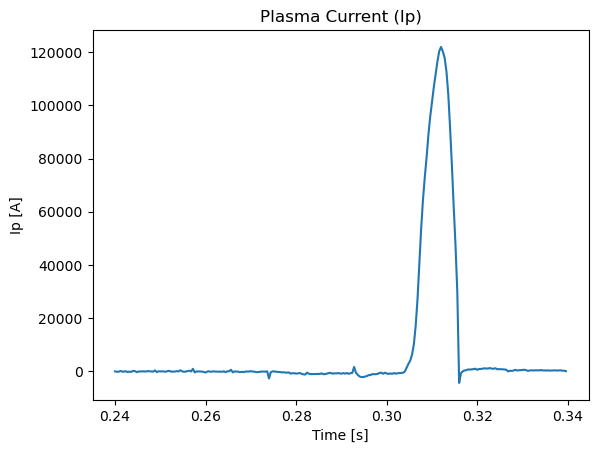
Credentials are stored in ~/.vest/database_raw_info.yaml with the password Fernet-encrypted using
~/.vest/encryption_key.key. setup_raw_db() uses input() prompts, so do not trigger it from an
unattended notebook — init_pool() and configuration() will call it if the YAML is missing.
load_raw initialises the pool automatically when it has not been built yet.
load_raw(shot, fields=None, max_retries=3, daq_type=None, sample_opt=False)
- A single
intfield returns a 1-D data array; alistof fields returns a 2-D array of shape(N, n_fields), column-stacked and truncated to the shortest field. load_rawnever raises — it logs and returnsNoneon any failure. Always check the result.
loaded = raw.load_raw(39915, [102, 101, 1])
if loaded is None:
    raise RuntimeError("raw load failed")
time, data = loaded
ip = data[:, 0]     # column order follows the requested field list
Finding field codes and shots
raw.name(102)                             # -> (field name, remark) from the shotDataField table
raw.vest_load_by_name(39915, "Plasma Current")   # load by human name (alias: raw.vest_loadn)
raw.get_all_field_codes_for_shot(39915)   # every field code recorded for the shot
raw.last_shot()                           # highest shot number in the database
raw.date_from_shot(39915)                 # ('YYYY-MM-DD', datetime)
raw.shots_from_date('2023-06-01')         # [shot, shot, ...]
raw.plot(39915, [102, 101])               # matplotlib quick-look
All of these need init_pool() first; they print an error and return None / [] otherwise.
vest_load_by_name resolves names through the packaged lookup table
vaft/data/legacy/sql_table.txt (a JSON mapping such as {"TF Current": 1, "Plasma Current": 102, …}),
also exposed as raw.SQL_TABLE_PATH:
import json
from vaft.database import raw

with open(raw.SQL_TABLE_PATH, "r", encoding="utf-8") as f:
    signal_to_field = json.load(f)
get_all_field_codes_for_shot omits raw.EXCLUDED_FIELD_CODES = {110, 111, 112, 113} (processed
triple-probe signals, which sit on a different time base).
Shot-range and timing rules
Which waveform table a shot lives in depends on its number, and load_raw returns None outside
these ranges:
| Shot range | Table |
|---|---|
29349 < shot <= 42190 |
shotDataWaveform_2 |
shot > 42190 |
shotDataWaveform_3 |
Sampling intervals are raw.FAST_DT = 4e-6 s and raw.SLOW_DT = 4e-5 s, classified against
raw.SLOW_DT_THRESHOLD = 5e-6 s. A DAQ trigger-delay correction is added to traces that start at the
digitiser origin: 0.24 s for shot < 41446, 0.26 s for shots 41446–41451, 0.24 s for 41452–41659, and
0.26 s from 41660 on.
Processing new shots automatically
The Thomson lineage (pipeline 2) has its own worker, vaft corrective-worker run, which watches the upload
directory instead of the SQL table; it is described in the Pipelines guide and in
workflow/automatic_pipeline_2_corrective_data_update/DEPLOYMENT.md. The rest of this section is the routine worker.
On the VEST server, vaft pipeline-worker run polls the SQL shot table and runs the routine
Snakemake pipeline on each new shot as soon as its upload has finished (issue #58). The upload
counts as finished when either condition holds:
- the shot’s field inventory contains every field the previous shot had, and nothing new has arrived for 30 s;
- no field has been uploaded for
quiet_seconds.
raw.shot_upload_status(shot) gives the inventory and the quiet time. Processed shots are re-checked
for fields that arrive late (raw.field_codes_by_shot) and reprocessed if any do. Its configuration is server-only; the workflow directory holds
worker.example.yaml as a template, and DEPLOYMENT.md there describes how to run it as a service.
The worker keeps its state in a SQLite file. Monitoring code reads that file without writing to it:
from vaft.database.worker import read_worker_state

with read_worker_state("/srv/vaft/pipeline/worker/worker.sqlite") as state:
    state.counts()               # {"completed": 812, "partial": 97, "excluded": 40, ...}
    state.shot(48950)            # state, classification, reason, attempts, last run
    state.stage_status(48950)    # each declared product's manifest status / replication state
Working offline
load_raw can read gzipped-JSON dumps instead of MySQL, which is how the test suite and the
processing pipelines run without database access. Two environment variables control it:
| Variable | Meaning |
|---|---|
VAFT_RAW_SAMPLE_PATH |
Path template for the archive; {shot} is substituted, e.g. vaft/data/legacy/shot_{shot}.json.gz |
VAFT_RAW_OFFLINE_ONLY |
1/true/yes/on forbids any live SQL access; load_raw returns None when no archive exists |
Resolution order inside load_raw is: an explicit sample_opt string → VAFT_RAW_SAMPLE_PATH →
(unless offline-only) the MySQL pool. raw.raw_offline_only() reports the current mode, and
raw.sql_loading_available() reports whether the MySQL driver imported at all.
import vaft
from vaft.database import raw

SAMPLE_PATH = vaft.data.data_path("legacy/shot_44740.json.gz")   # packaged archive

loaded = raw.load_raw(44740, 102, sample_opt=str(SAMPLE_PATH))
time, plasma_current = loaded
Produce your own archive for a shot with:
raw.init_pool()
raw.dump_all_raw_signals_for_shot(shot=44740, output_path="vest_raw_44740.json.gz")
dump_all_raw_signals_for_shot(shot, output_path=None, max_retries=3,
                              daq_type=0, slow_dt_threshold=5e-6, plot_opt=False)
It writes {"shot": n, "fields": {code: {"type": "fast" | "slow", "data": [...]}}} as gzipped JSON,
defaulting to ./vest_raw_{shot}.json.gz (a .gz suffix is appended if you omit it) and returning a
bool. plot_opt=True also saves an overview figure. raw.compare_db_and_dumped_raw_signals_for_shot
overlays the database and dumped traces for QA.
The pipeline scripts use exactly this pattern —
generate_raw_db_dump.py
creates the archive, and
generate_diagnostics_ods.py
sets VAFT_RAW_SAMPLE_PATH and VAFT_RAW_OFFLINE_ONLY before building the diagnostics ODS.
Where to go next
- Data structures — what is inside the ODS you just loaded.
- Signal processing and EM modeling — turning raw signals into physics quantities.
- Examples — the notebook tour.
Notebooks
database_initialization_and_load.ipynb— connect, list, load and save shots.vest_raw_signal_sql_database.ipynb— raw SQL signals and the offline archive path.vest_experimental_data_list.ipynb— surveying what exists in the database.
Source